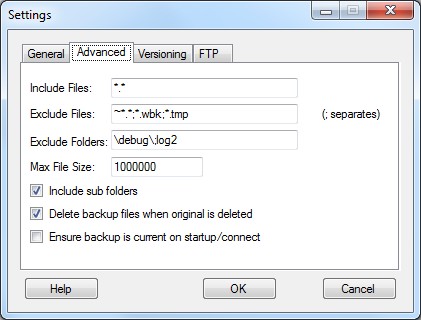
Advanced Tab
You may alter the Include files. This is a single file mask which is generally "*.*". You can use any other valid Windows file mask such as *.doc or file*.* or file??.doc? etc. You also may select as many as you want by separating them with a semi colon (no spaces). For example: *.doc;*.xls
Select the files you wish to exclude from the backup using standard Windows file masks. This is commonly set to "*.tmp" (or "*.tmp;~$*.doc" if you use MSWord) to exclude temporary files from the backup. You may select as many as you want by separating them with a semi colon (no spaces). For example: *.tmp;*.old;log.txt;cache???.*
You may also select any folders to exclude from the backup using standard Windows file masks. This is generally left blank, but you may select as many as you want by separating them with a semi colon (no spaces). For example: \logs\;\temp*
Note on File Masks: * means any number of characters; ? means any 1 character. They may be used in any combination.
Specify the maximum size of files to copy. The letters K,M and G are converted to the appropriate number of zeros.
Tick the box "Include sub folders" if you which to include sub folders of the watch folder in the backup.
Tick the box "Ensure backup is current on startup/connect" if you which the program to check that the backup files are all the latest copy every time the program starts (and once a day) or when a removable drive (USB or Firewire drive) is reconnected. You can also manually start this this from the main screen. This option will default to on when a watch is created for a removable drive.
If you wish to delete backup files when the original file is deleted then tick the "Delete backup files when original is deleted" box. This is not selected by default.
Copyright © 2007-2009, Hunter Beanland
Created with the Freeware Edition of HelpNDoc: Easy to use tool to create HTML Help files and Help web sites